James' Homelab - 2022 A year in review
2022 has truly been my year of homelabbing, with learning, iteration and change being a reoccurring theme. I began the year with a somewhat humble homelab, and while I’m not ending it with anything outrageous, it’s certainly come a long way. Looking into the next year, I plan for less hardware changes, but there’s certainly a lot more to learn.
How it started
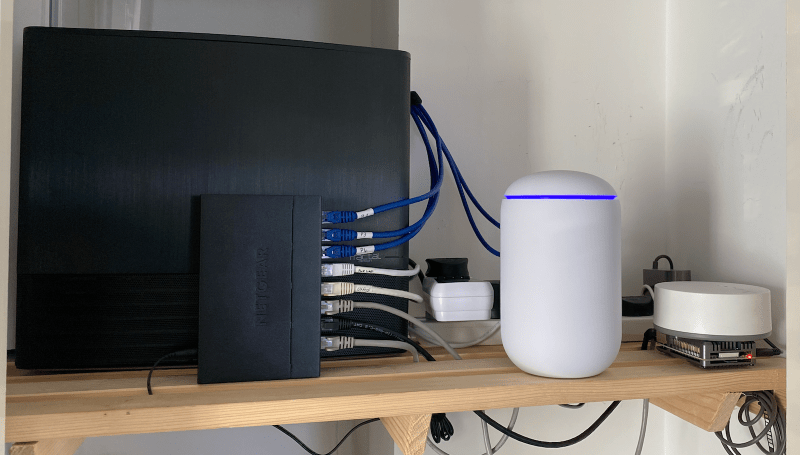
I began 2022 with a Synology DS720+ as my file and Plex server, a Dell Optiplex small form factor PC as an application server and the Unifi Dream Machine (UDM) for my router.
 Yes that’s a Makita belt sander and a car cleaning kit behind, storage is tight in this apartment 😅
The Synology is a great little machine, and while they’re a bit more pricey than competitors, the hardware and software quality make up for the price difference.
The Dell Optiplex is a low power, small form factor PC with a 6 core i5-9500T, 16GB RAM, 256GB NVME SSD and a 1TB SATA SSD. Bought fairly cheap on eBay, these are a common choice for low power and low budget homelabs. For me it was essentially a docker box. I started on Ubuntu server, but quickly swapped to Proxmox and then an Ubuntu VM. While it was a good little machine, the single NIC was becoming bit of a bottle neck along with the lack of cores / threads. And so I sold this in the summer, but in hindsight wish I’d kept it.
Finally, the Unifi Dream Machine, UDM from here on, is a good little router and certainly a nice upgrade from your ISP or run of the mill (insert brand name) router. However I’ve certainly ran into some issues with it and so I’m considering a pfSense box.
The big upgrade
I mentioned above I sold my Optiplex in the summer, replacing this was my new customer built “server”. With more RAM, cores, storage and expandability, this new server also managed to change another 2 times before arriving at the current configuration.

Initial Specs:
- CPU: Intel i7-10700
- RAM: 32GB Corsair Vengeance LPX 3200
- Motherboard: MSI MAG B560M Mortar
- SSD: 2TB Samsung 980 Pro
- PSU: BeQuiet Pure Power 11 400w
- CPU Cooler: BeQuiet Shadow Rock LP
- NIC: Intel I350 T4
- Case: Fractal Node 804
The CPU has 8 cores, 16 threads, it’s 65W TDP (not “K” series), and importantly for me, supports Intel QuickSync - Intels video encoder, supported by applications like Plex and Handbrake.
I opted for a consumer motherboard and RAM, being much cheaper than server hardware and sufficient for my use cases. This freed up some budget for the 980 Pro, a solid SSD for fast and reliable storage.
The case was purchased very cheap second hand from a friend and done the job nicely, for now…
My idea for this new server was to replace my Synology and the Optiplex. It would be my file server, Plex server, a small Minecraft server for friends and a Docker host.
I had played with Unraid and TrueNAS but encountered a number of issues with both, so eventually ended up going back to my Synology as my primary file server. The Minecraft server also didn’t go to plan, but not from a lack performance. I didn’t want to port forward and so used FRPC to proxy though a Linode VPS, however the latency was too much for my friend on the other side of the planet.
So the new server became a somewhat over powered Docker host, running Proxmox with a few VMs, using Ubuntu as the Docker host.
Iteration 2
The case was a little large and bulky for the space it was in. I also didn’t need the 3.5” bays now I had switched back to my Synology. Additionally I was after a 5.25” bay for a blu-ray reader. While the fractal supports slim slot readers, I wasn’t able to find one that would support the custom firmware to rip (backup) my UHD blu-ray collection. So I switched to the Silverstone GD09, a compact case with support for a 5.25” and fitted in my shelving unit. It’s worth noting the sides of this unit is mesh, so the server had plenty of air flow.
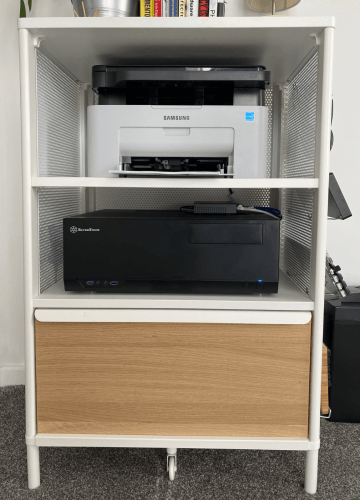
I also needed to add a PCI SATA card in order to pass through the SATA controller to the Windows VM in order to use the blu-ray drive with it. Paired with MakeMKV, I was ripping and backing up my blu-ray collection. On occasion MakeMKV would no longer find the drive, but shutting down the sever and power cycling resolved this.
Iteration 3 (The current configuration)
After much consideration and a little convincing from a friend, I decided to give Unraid another chance. With 2 only bays on my Synology, I needed more storage capacity and with Synology moving to AMD across their line up, a new NAS was out of the question.
So after much deliberation I decided to rebuild my sever in yet another case, this time the Fractal Refine R5. The plan was to rehouse my server back into the cupboard I initially put it in, however this time I purchased a shelving rack that would fit the awkward space.
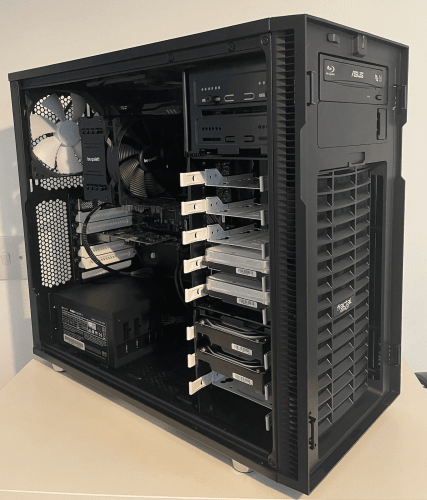
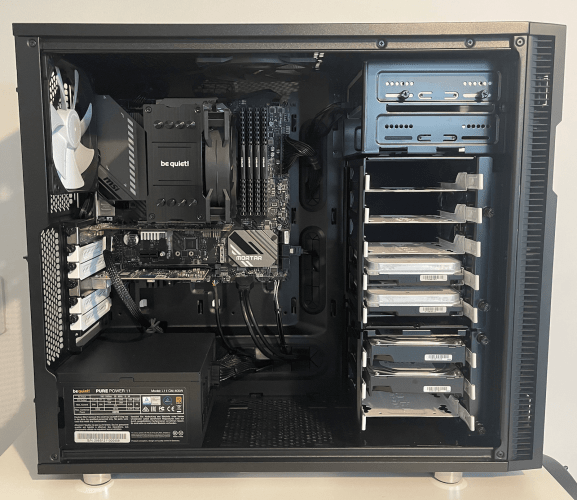
This time the Unraid setup and configuration went a lot more smoothly, although I did have some issues (from user error) setting up a bond with the 4 NICs on the Intel network card. Finally I setup a balancer round robin across the 4 NICs.
I was also able to take out the PCI SATA card and use the MakeMKV docker image in Unraid, passing the device path instead of a SATA controller.
Final Thoughts
Over the last few months of running Unraid I’ve really dialled in the configuration to work for me. All of my app data is stored on the SSD, making docker images and VMs blazing fast, and allowing the HDDs to spin down. The rest of my files are spread across these hard drives, and for now a single parity drive.
For the most part I’m using the Unraid docker interface, although this can be a little lacking for more complicated configurations where the use of Docker Compose would simplify things. Portainer may fill in the blanks here for some people, however I just span up a minimal Ubuntu server in a VM to run docker for these specific use cases.
I’ve setup a local Nextcloud to replace Synology drive for syncing smaller files like documents across my computers and devices. But I need to better utilise its other features like the Calendar and Contacts in hope to further replace cloud services like iCloud. I do still use SMB shares for larger files like backups and media.
Other changes and improvements
Networking
This year I also began to step further into networking! With help from a friend I setup VLANs on my network, purchased some managed Netgear switches and segmented my network appropriately. This coincides with some firewall configuration and also helped me configure a VPN server for remote connections to my home network when out and about.
While I’ve done all this on the UDM, I can’t help but feel that Unifi makes some of this configuration long winded and or tricky. In addition, there’s known problems like not being able to create a firewall rule preventing VPN clients access to the controller. I’m hopefully that the new controller OS update will resolve some of my bugbears. Failing that, the switch to pfSense I think is inevitable.
Raspberry Pis
I played a little with the Raspberry Pi this year, creating a small cluster to learn Kubernetes. This was a super cool little setup with a fancy cluster case and all, but I just wasn’t using it. So like the optiplex, I sold them on at a fair price to a friend. However, I intend to revisit the Pi moving PiHole from the sever to a Pi, along with my reverse proxy, NUT (a network UPS server) and potentially a second Pi for redundancy.

Currently, if the Unraid server is offline for any reason, devices are unable to resolve the DNS as it’s hosted on the server. “Well setup a second DNS entry in your router” I hear you cry, however it would seem doing so results in my devices using this second DNS entry to resolve domains in my PiHole blacklist, rendering the PiHole useless…
I also tried the Pi TV hat, allowing me to receive digital DVB-T2 signals, a bit like the HD Homerun, but seemingly worse… I had a great deal of issues configuring, receiving and streaming live TV with the Pi TV hat. The tuner seemed hit and mis on whether it’d find channels that my TV would otherwise pick up when plugged-in directly to the buildings antenna. I tried a signal booster which did improve my results, but still wasn’t sufficient.
UPS
After putting it off for a long time, I finally have a UPS now. I ordered an Eaton Eclipse 500, which in the pictures on Amazon showed a USB for management, however this model doesn’t include USB management. I ended up keeping this UPS and ordering a second, the 650 with USB. Now if the power goes out, my server and NAS can gracefully shutdown.
Synology
The Synology still has its uses in my homelab, now primarily as a backup server using some of their great apps. Synology Photos has become my tool of choice for backing up and viewing my photo library from my phone across devices. Active Backup allows me to backup appdata, files and media from my Unraid server via SMB. And finally I use Hyper backup to then backup the most important files to Synology C2 for offsite backups.
All together
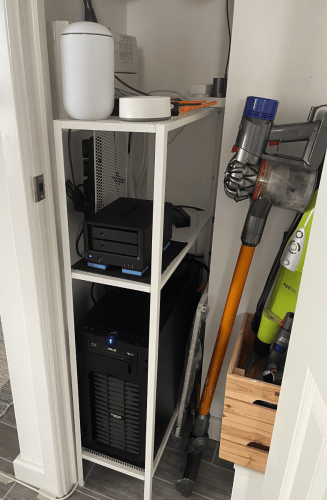
Capping off the year
So as you can see, a lot’s changed this year and I’ve certainly learned a lot. But going forward there’s a number of things I plan to change in 2023:
- Add a Unifi Wifi AP, the UDM Wifi is patchy at best.
- Implement monitoring for my servers and containers.
- Replace NGINX Proxy Manager with Traefik.
- Expose limited access to services like Plex via Tailscale funnel.
- Potentially replacing my UDM with a pfSense box.
- Potentially replace my Ikea smart lights and hub with Phillips Hue - I have to restart this thing multiple times a week for it work in HomeKit.
I’m also really interested in finding ways to reduce my homelabs power usage. I’m by no means an eco warrior, but certainly notice the increase on my power bill here in the UK this year. Combined with smaller form factor systems, I really feel the lower power / small form factor homelab community is pushed side for big, power hungry server racks.
And finally, more guides and blog posts! Stay tuned.