Troubleshooting WAN Dropouts
Ever since I configured a failover Internet connection on my pfSense firewall I have been working on getting more visibility over the router and overall health of my connections.
I stumbled across a pervasive issue over the last year, whose cause has until recently eluded me, and it wasn’t DNS.
TL;DR Did I find an answer? Yes. Did it fix the problem? No.
Every Plot Needs a Beginning (or villain)
The first signs of trouble happened in January 2024 when my primary ISP experienced an outage. I happened to be on holiday and out of the country at the time and remember receiving some disjointed alerts around sites being down. Surely the backup connection would have kicked in and prevented this, as I shook of the sleep and shuffled for my laptop. Tradition dictates that all outages must take place between the hours of midnight and 4am.
The build up was rather anticlimactic because I was not able to log in to my management VPN, the Internet was well and truly dead. I like to call this stage “Us or Them?”. I chose the latter and checked the minimalist page that is Lit Fibre’s status page and surely enough there was an outage!
There was nothing else but to wait this one out and I opted to try and get some more sleep. Fast-forward an hour or
two, and I was able to quickly log on to my VPN and update the router settings. My original mistake was configuring
the WAN failover to use Member Down, the problem is that this only works if the Optical Network Terminal (ONT) loses
power or dies. I corrected this oversight and switched the router to monitor for Packet Loss.
While snooping around the admin panel I configured the notifications settings to use my local SMTP relay to send alerts on critical system events, including WAN failover event.
My work here was done.
The Plot Thickens
I watched my router gracefully failover between WAN connections over the next few hours, taking a moment to feel pleased with myself, while waiting for the primary service to be fully restored. I set about the rest of my day thinking that was it, little did I know that this was only the beginning of the next adventure.
The following events take place over the days, weeks, and months of 2024.
This started with what initially felt like the occasional WAN failover notification, usually late at night, I originally attributed to out of hours maintenance.
The notifications only continued to grow in frequency and began to escape their late night prison, more alarmingly the duration of lost connectivity too began to grown. To the point where the only way to breathe life into the connection was to power cycle the ONT. Something definitely was not right.
The gateway logs were filled with this error.
can't allocate llinfo for 188.74.xx.xx on ix2
These forum posts and articles are some examples I could find of others facing similar problems.
- pfSense dual WAN. Periodic loss of WAN connection
- pfSense: arpresolve: can’t allocate llinfo for X.X.X.X on emX
- My ISP cannot extend the DHCP lease and renew the ip connection every second hour
Let’s Work The Problem
I am always careful to not point fingers when dealing with an issue, it’s not particularly humble or a good way to get help.
Try to have your house in order before reaching and asking any questions. I like to use these events as a chance to dig deep and make sure I’m not missing anything. I’m more than happy to be wrong.
The first step was figuring out what was actually happening.
- Check the logs and enable more if needed.
- Was the interface going down?
- Was it the ONT?
- Is there an outage?
- Is it us or them?
At this point I could confirm that from the router’s side I was indeed seeing packet loss. The good news was the failover was working as it should and my backup connection was picking up the slack within a few seconds and updating the Cloudflare DNS records.
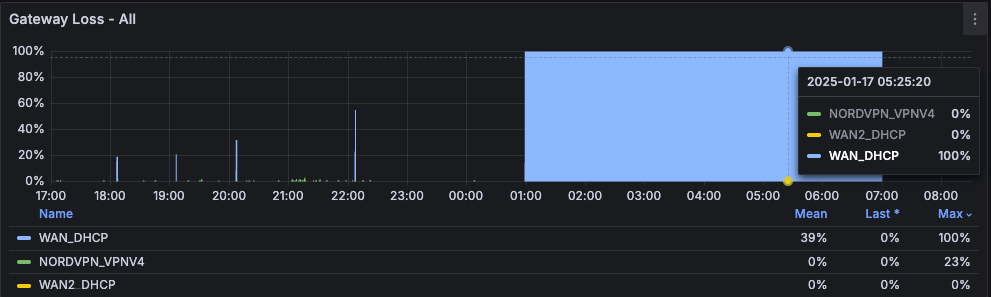
Logs - Symptoms
What I had at this point were lots of symptoms but no causes. I could see dpinger, pfSense’s gateway monitoring utility, flag the packet loss and initiate the failover. What I couldn’t see was why.
Dec 6 13:13:52	dpinger	82655	LIT 188.74.xxx.xxx: Alarm latency 10941µs stddev 4235µs loss 41%
Dec 6 13:37:08	dpinger	82655	LIT 188.74.xxx.xxx: Alarm latency 2361513µs stddev 1710025µs loss 90%
Dec 6 13:37:24	dpinger	82655	LIT 188.74.xxx.xxx: Alarm latency 669031µs stddev 1387526µs loss 64%
Dec 6 13:37:48	dpinger	82655	LIT 188.74.xxx.xxx: Clear latency 329279µs stddev 1018864µs loss 25%
Triage
I felt I had enough information to hand to get in touch with the ISP and start asking questions.
The key word here was try. Without labouring the point, what should have been a simple conversation in reality spanned Spring, Summer and Autumn. I would describe my experience somewhere in between the standard line of we don’t support third party routers, we can’t see anything, to outright gaslighting.
Woosah…
There was one helpful exchange that compared some of the failover timestamps and power cycling the ONT. This confirmed that my WAN drops were not visible from their side. For better or worse I knew I was dealing with a black box and I would have to find as much as I could internally.
While it did take some time, this did double my resolve to keep digging.
This sends the investigation into a whole new direction
I started to look at this from the perspective of what the ISP actually provides, which drew my attention to the static IP. At which point the obvious hit me, what if my static IP really isn’t a static IP.
It had been staring at me the whole time, even though I have a “static IP”, it is really just a long term DHCP lease. Or, not so long DHCP lease.
bound to 188.74.xxx.xxx -- renewal in 1800 seconds
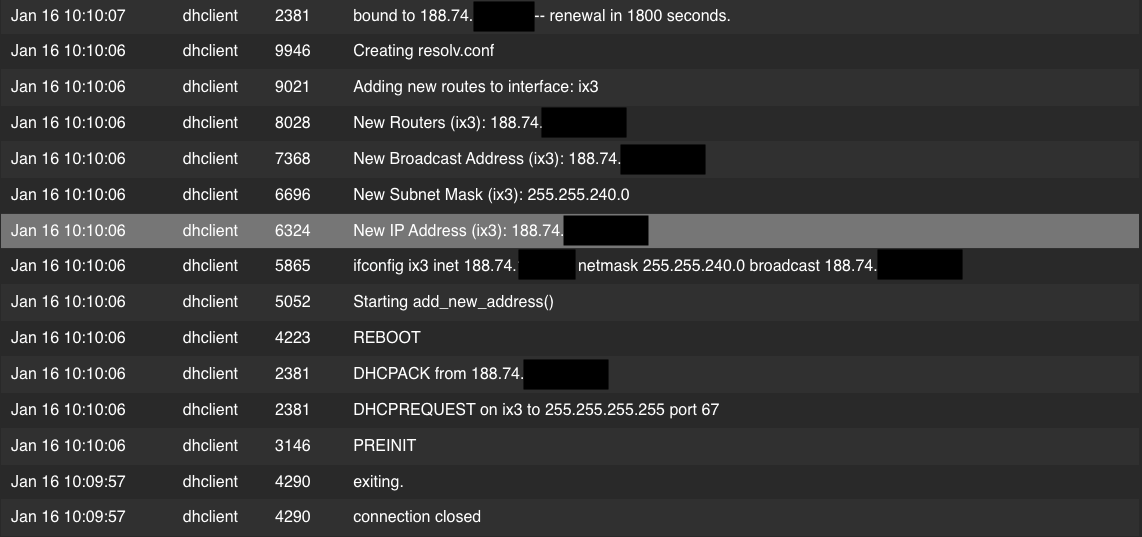
Questions started swirling in my head.
- Why is it being renewed every 30 minutes and why is the lease only an hour long?
- What is the DHCP lease on my Virgin Media connection?
After doing some reading, I tried increasing the renewal and lease times. The configuration was saved, but wasn’t applying. The DHCP lease times were not budging.
supersede dhcp-renewal-time 43200, supersede dhcp-lease-time 86400
supersede dhcp-renewal-time 3600, supersede dhcp-lease-time 86400
Below is a comparison of the two DHCP leases from Lit Fibre and Virgin Media.
You can find the DHCP configuration for each interface in /var/db/dhclient.leases.interface-name.
Lit Fibre DHCP Lease
lease {
  interface "ix3";
  fixed-address xxx.xxx.xxx.xxx;
  option subnet-mask 255.255.240.0;
  option routers xxx.xxx.xxx.xxx;
  option domain-name-servers 8.8.8.8,8.8.4.4;
  option host-name "redacted";
  option dhcp-lease-time 3600;
  option dhcp-message-type 5;
  option dhcp-server-identifier 188.74.xxx.xxx;
  option dhcp-renewal-time 1800;
  option dhcp-rebinding-time 2880;
  option dhcp-client-identifier 1:b8:ff:b3:a:9b:68;
  renew 4 2025/1/16 08:45:29;
  rebind 4 2025/1/16 09:03:29;
  expire 4 2025/1/16 09:15:29;
}
Virgin Media DHCP Lease
lease {
  interface "ix3";
  fixed-address xxx.xxx.xxx.xxx;
  filename "xxx.xxx.xxx.xxx.cm";
  option subnet-mask 255.255.252.0;
  option routers xxx.xxx.xxx.xxx;
  option domain-name-servers 194.168.4.100,194.168.8.100;
  option host-name "redacted";
  option domain-name "cable.virginm.net";
  option dhcp-lease-time 604800;
  option dhcp-message-type 5;
  option dhcp-server-identifier 80.1.20.1;
  renew 2 2025/1/14 01:32:08;
  rebind 4 2025/1/16 16:32:08;
  expire 5 2025/1/17 13:32:08;
}
Presenting My Findings
I reached out to Lit Fibre again with my DHCP findings in a lengthy email thread.
Configuration checks asked for along the way:
- Disable gateway monitoring - no impact.
- Monitor for only latency and not packet loss - no impact.
My line of questioning continued to focus on the short DHCP lease. If renewals are being forced every 30 minutes, then the chances of failing to secure a lease are significantly hire.
Compare a seven-day lease against one that tries to renew every half hour.
- That is 48 renewals per day, that is 336 renewals per week!
- Versus 1 renewal per week.
I see this as 336 chances for a failed DHCP lease and breaking your Internet connection.
Now for the unclimactic conclusion. While the request to check the logic behind the short DHCP leases was escalated, any request to change the duration was declined.
During the year, CityFibre and Lit Fibre underwent an acquisition cycle. Meaning that CityFibre now owns the infrastructure and has added it to its larger network. This opens the market for other ISPs to start offering service.
- CityFibres completes is acquisition of Lit Fibre
- CityFibre agrees sale of Lit Fibre ISP to its co-founders
I did ultimately end up canceling and switching over to a new provider, they use PPPoE and provide a dedicated static IP. It is a somewhat anticlimactic conclusion, but I am glad that my Internet connection consistently works.